Can You Make a Digital Photo Actually Look Like Film?
Lightroom
I shot the same scenes in Chiang Mai on Portra 400, a Fuji X100VI film recipe and a Sony edited with my warm Portra preset. Here's how close digital can really get to the film look.
·
9 min read

So how close can we actually get to the film look with a digital camera? Film emulation seems to be all the rage these days, especially with cameras like the Fuji X100 series, which have a ton of film recipes you can plug into the camera so it spits out a JPEG that supposedly looks a lot like film.
I wanted to put that to the test. So I went out on the streets of Chiang Mai, Thailand, with three cameras:
My Konica Hexar RF shooting Portra 400 film
My Fuji X100VI with the Portra 400 recipe from Fuji X Weekly
My Sony A7 IV, with every photo edited using my warm Portra preset
I've been using that preset more than any other preset recently, because I think it looks really good. But I wanted to know how close it could actually get to a real Portra 400 shot.
READ OR WATCH: This blog post is also available in video form! If you'd rather watch me explain this content, simply watch the video below. Otherwise you can find the text guide below. Just keep scrolling!
In Can you make a digital photo ACTUALLY look like film?, I shoot the same scenes side by side on all three cameras.
How I tested film vs digital
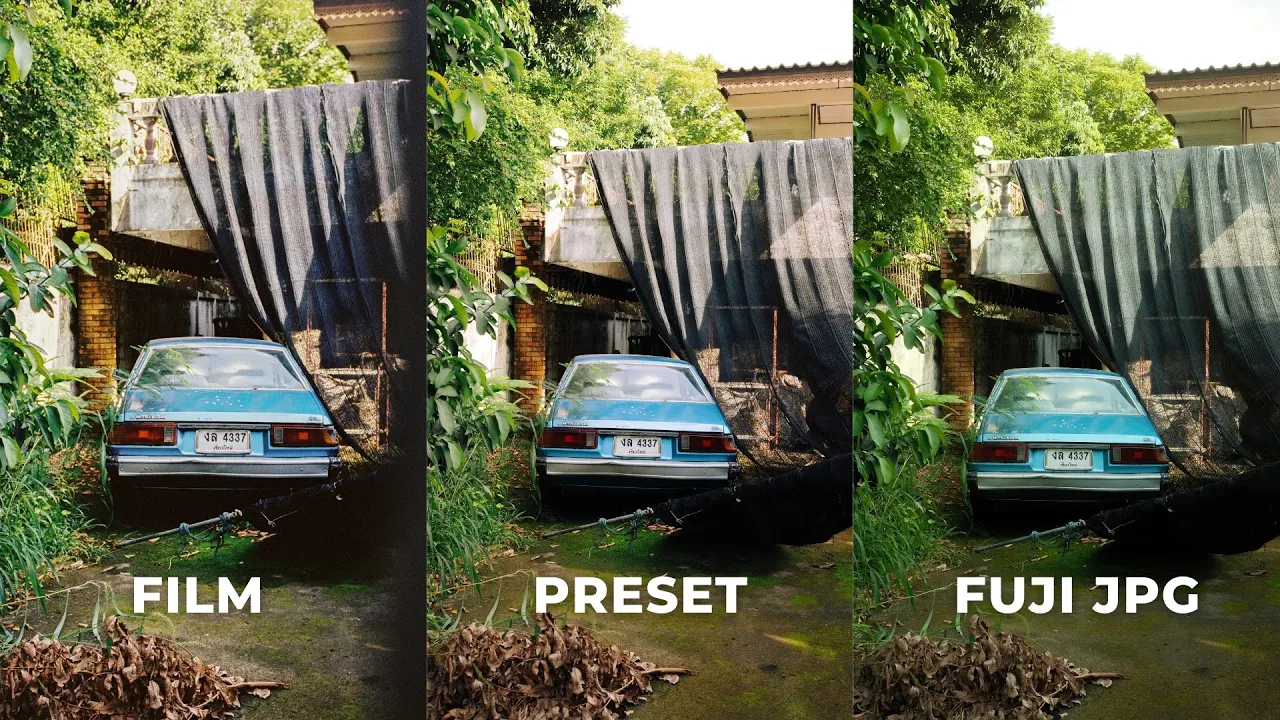
First and foremost, shooting with three different cameras is totally not a vibe, and I do not recommend it. But I used 35mm lenses on all three, so at least the focal lengths are similar. The Fuji felt a little more zoomed in, but generally speaking, all the photos have very similar or the same compositions. Each comparison below is labeled, so you can see which shot came from film, the Fuji recipe and the Sony with the warm Portra preset.
One nice thing about having a digital camera with you: I could meter with it, so I didn't have to worry about metering on the film camera.

Round 1: the film shot wins
Honestly, I think the film looks really, really good in this first one. It has a natural warmth in the highlights, and the colors look much deeper, especially the reds in the tail lights. The contrast is a lot higher than the other two shots, but it looks great.

The Portra 400 recipe just feels a little bit meh to me, and I noticed this throughout a lot of the images. It has a green tint, and it feels like the colors were slapped over the top of the image in a thin veil, instead of being deep and ingrained in the image like they are in the film photo. With a few adjustments you can get it closer, but straight out of camera, in this shot, the Fuji recipe doesn't line up with the film.
The Sony shot with the warm Portra preset splits the difference between the film and the Fuji. It's a little warm, but it looks really nice, and because it's a RAW file, you can make a lot more adjustments to get it to look exactly like the film photo. It might not match right out of the gate, but with a few adjustments you can get it pretty dang close.
Round 2: color depth in the highlights and shadows
Most people don't realize this about Chiang Mai, but it's full of amazingly beautiful, super cute cafes. One of them, Transit No.8, has been decorated to look like Japan. They took over both sides of the street, with a little bench for waiting for the bus, a vending machine, soft serve, coffee shops and even a little train station. It reminds me of Disneyland in a way, and it's really fun to photograph.

Once again, I think the film looks so good here. It kept a lot of color detail in the brighter areas, and it has a natural, organic warmth. I really like that reddish tint you get with Portra, which I think is pretty common with this stock, and it adds a lot of color depth.
The Fuji really fell short in this one. The shadows feel flat, there's a weird color tint over the image, and it just doesn't look that good. I brightened it up a little in post and added some contrast, and it looks a lot better, but it's still missing that beautiful color depth in the highlights and shadows.
Try the V2 recipe. I shot all these Fuji photos with the Portra 400 recipe V1. There's also a V2, and when I opened it up in Fuji X Studio and played around with it, I actually think it looks better. So if you're shooting with an X100 and chasing the Portra 400 look, I'd go with V2.
The Sony with the warm Portra preset looks a lot closer to the original film than the Fuji JPEG. Again, I think that's because it's a RAW file, so you have much more control. But to get contrast in the foreground while keeping the color and detail in the sky, I had to use selective adjustments. With the film camera, that's straight out of camera: really nice dynamic range, a lot of color depth, good contrast in the foreground, and pretty decent detail in the highlights. Film tends to hold on to the highlights really well compared to digital.
Round 3: where digital beats film
In this shot, I think the Fuji and Sony actually look better than the film. The big reason is the lack of dynamic range in the film shot. The contrast is much higher, and you lose some of the color depth the digital photos keep.

I think a big part of that is the lab didn't send me back perfectly flat scans. I'm not at the point where I'm scanning my own film yet (I really want to), but most people aren't anyway. Most people send their film to a lab and look at what comes back. I asked two different labs for flat scans and still didn't get the dynamic range I think I could have with self-scanning or a better scanner. The second lab even told me the first lab used an over-concentrated solution to develop it. So you could probably get a lot more dynamic range out of your film than you're seeing here.
Round 4: film colors still pop
Even with that reduced dynamic range and higher contrast, I still think the film looks really good. I shot this one at a temple in the mountains near Chiang Mai. The film shot has a lot more contrast, but the colors pop so much more than in the digital files, especially the reds and oranges of the temple. It has that natural warmth and redness that looks so good with Portra 400.

I shot this next one to take a closer look at color. I love the colors coming out of the film: the yellows, reds, oranges, blues and greens all look really nice and full, if that makes sense. The Fuji recipe has that weird bluish-green tint, and it doesn't look great. The Sony with the warm Portra preset strikes the middle ground again. It's a little warmer than the film, especially in the shadows, but it looks good and keeps the same vibe you get from Portra 400.

Why digital photos still look digital
One of the biggest differences between film and digital is that sometimes digital photos just look super digital, and it can be hard to shape them into the film look. Sometimes it works, sometimes it doesn't. In this high-contrast scene, the film keeps a lot of color depth and detail. The Fuji has that veil of color thrown over the top and looks super digital. The Sony strikes the middle ground and looks good, but it does still look pretty digital.

Use a Pro-Mist filter. One thing I've done in the past with my Fuji cameras is put a Black Pro-Mist filter on the front. I used a 1/4 for a long time and now use a 1/8, but for some reason I took it off before shooting these. Looking back at JPEGs I've shot with the filter, it softens the highlights and makes them bloom a little more, which gives a more filmic vibe and makes the file look less digital.
So, how close can digital get to the film look?
Pretty damn close, but it's never going to be exact, for the simple reason that they're completely different mediums. With film, you're burning chemicals onto film. With digital, it's a sensor. It's completely different technology.
But I don't think you need a perfect one-to-one film look to capture the same vibe. I don't think the guys at Fuji X Weekly were trying to mimic Portra 400 100% with their recipe. They were trying to capture the same feeling you'd get from a photo shot on film. I've shot some of my favorite photos ever on the X100V and X100VI, and even though they don't match film one to one, they still have that timeless vibe, and I think that's the most important thing. The same goes for my warm Portra preset. It's not a one-to-one recreation of Portra 400, but it has that same timeless, warm film vibe. When you edit a digital photo to look like film, the most important thing is capturing the same emotion you'd get from a film photo.
Is film better than digital? There are so many videos online asking which one is better, and I don't think you can see it that way. They're just different. Film is hard to shoot, hard to travel with, hard to expose, expensive to develop and scan, and a lot slower than seeing your photos right away. For some photographers those are all downsides. For others, they're the whole point: they like engaging with it creatively and waiting for that dopamine rush until the scans come back from the lab. That's why I love shooting both, and I'll keep doing it. (If you're curious about my film camera, here's my Konica Hexar RF review, and here's what I think of the Fuji X100VI for street photography.)
Which did you prefer, the film photos or the digital ones? Let me know in the comments on the video.
Happy shooting!
Want the warm Portra preset? It's included in my free Lightroom preset pack, the same preset I used to edit every Sony photo in this post.


Sean Dalton
Made with ☕ and a camera.